Skip to content

TrueCommunity

Community, courses and messages inside your own WordPress site.

  • Home
  • Pricing
  • Docs
  • Contact
  • Log in
  • Download

Getting Started

5
  • What is TrueCommunity?
  • Install TrueCommunity
  • Install TrueCommunity Pro and activate your license
  • Quick setup: launch your community in 5 minutes
  • Find your way around the community

Settings

5
  • Name your community and change its URL
  • General settings: logos and upload limits
  • Turn features on or off (Modules)
  • Email settings and notification emails
  • Migrate existing users

Activity Feed

5
  • Create a post
  • Create a poll
  • Like, react and comment
  • Bookmarks: save posts for later
  • Edit, delete, share and search posts

Members & Profiles

3
  • Your profile
  • Find members and add friends
  • Block a member

Groups

4
  • Groups explained: public, private and locked
  • Create and edit a group
  • Join, post in and leave a group
  • Manage group members and roles

Courses

6
  • Create a course
  • Add sections and lessons
  • Create quizzes
  • Enroll students and manage course members
  • Take a course (student guide)
  • See quiz results

Messages & Notifications

2
  • Send private messages
  • Notifications

Pro: Advanced Courses

8
  • Course settings
  • Add topics inside lessons
  • Lesson and topic rules
  • Review assignments
  • Challenge exam: let students test out
  • Sell a course
  • Reset a student’s progress
  • Quiz submission details

Pro: Gamification

8
  • Gamification overview and setup
  • Tracked activities
  • Ranks
  • Badges
  • Challenges
  • Manage member points
  • Gamification settings
  • The Rewards page (member guide)

FAQ & Troubleshooting

2
  • Frequently asked questions
  • Troubleshooting
View Categories
  • Home
  • Docs
  • Pro: Gamification
  • Tracked activities

Tracked activities

1 min read

0:00 / 1:10
  • View as Markdown Open this page as plain Markdown (opens in a new tab)
  • Open in ChatGPT Ask questions about this page (opens in a new tab)
  • Open in Claude Ask questions about this page (opens in a new tab)
  • Open in Google AI Studio Ask questions about this page (Google account required) (opens in a new tab)

Pro feature: This page needs TrueCommunity Pro.

Go to Gamification Pro → Activities.
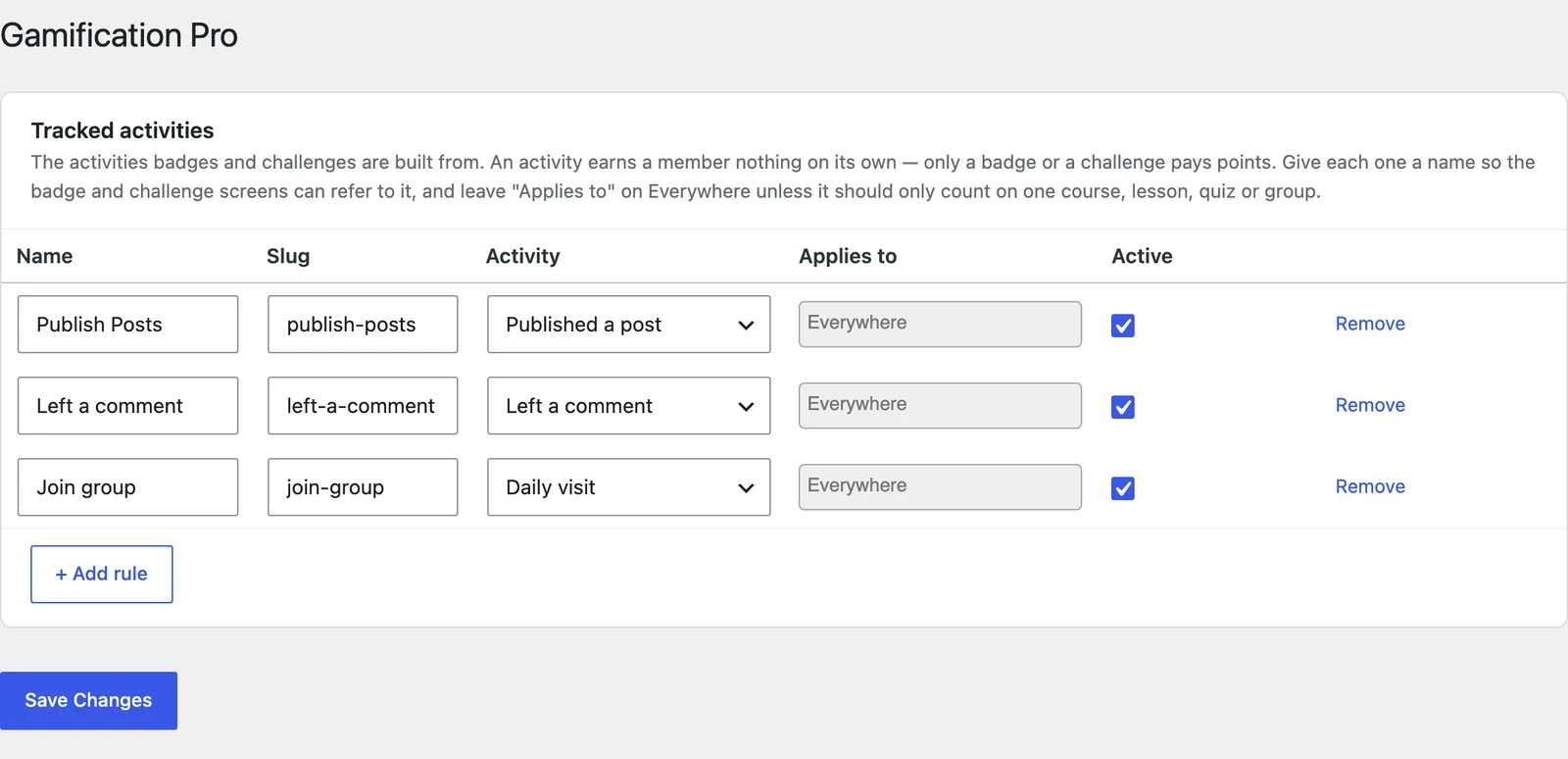
The Activities screen

Each row is one activity you want to track. Badges and challenges are built from these rows.

ColumnWhat to enter
NameA clear name, like “Finished a lesson”. Badges and challenges show this name.
SlugA short ID. Filled in for you from the name.
ActivityWhat the member must do (see the list below).
Applies toLeave on Everywhere, or pick a specific course, lesson, quiz or group to count only that one.
ActiveUntick to pause the activity.

Click + Add rule to add a row, then Save Changes.

Activities you can track #

GroupActivities
CoursesEnrolled in a course · Completed a lesson · Completed a topic · Completed a quiz (any score) · Passed a quiz · Scored 100% on a quiz · Submitted an assignment · Had an assignment approved · Completed a course · Completed all lessons / topics / quizzes in a course
CommunityPublished a post · Left a comment · Liked or reacted to a post
GroupsJoined a group
SystemDaily visit

Tip: Make two rows for the same activity if you need both: one “Completed any lesson” on Everywhere, and one “Completed the onboarding lesson” pointed at one lesson.

Good to know: If you remove an activity that badges or challenges already use, you are warned first. Badges members already earned are kept.

Updated on October 9, 2026

What are your Feelings

  • Happy
  • Normal
  • Sad

Share This Article :

  • Facebook
  • X
  • LinkedIn
  • Pinterest
Gamification overview and setupRanks
Table of Contents
  • Activities you can track
  • Features
  • Pricing
  • Contact
  • Privacy
  • Terms
  • Refunds

© 2026 TrueCommunity