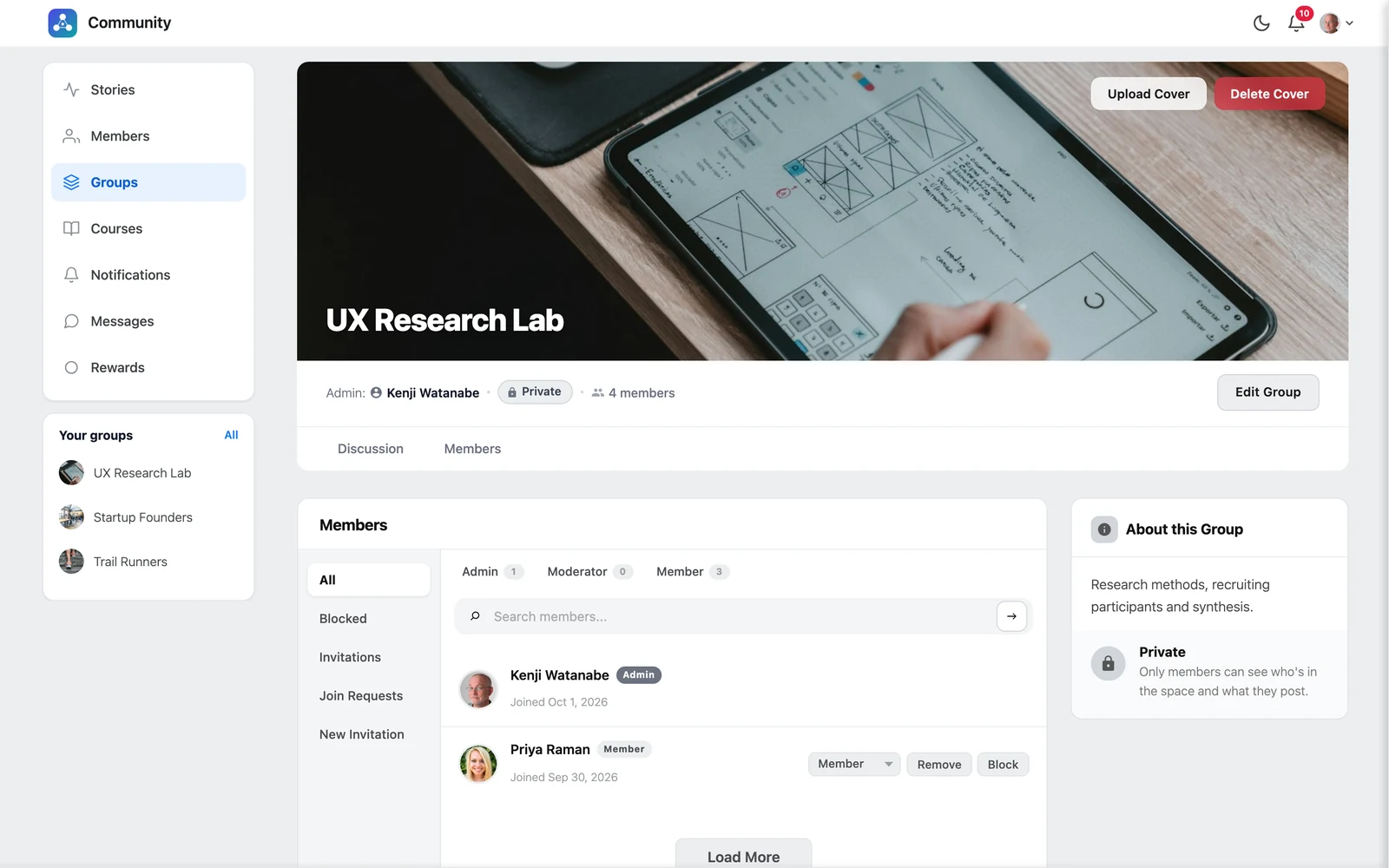
Open your group and click the Members tab.
Group roles #
| Role | What they can do |
|---|---|
| Admin | Everything: edit the group, invite people, approve requests, change roles, remove and block members |
| Moderator | Invite people as members, approve join requests, remove and block members, change the cover |
| Member | Read and post in the group |
The Members tab #
| Section | What it is for |
|---|---|
| All | Everyone in the group, filtered by Admin, Moderator or Member |
| Join Requests | People asking to join a private group — click Accept or Reject |
| Invitations | Invitations you sent that are not accepted yet — you can Cancel them |
| Blocked | People blocked from the group — you can Unblock them |
| New Invitation | Invite someone new |
Invite someone #
- Click New Invitation.
- Search for the person. People already in the group are not listed.
- Choose their Group role.
- Click Send invitation. They get a notification and an email.
Good to know: Only group admins can invite someone as an admin or moderator. Moderators can invite people as members.
Change a role, remove or block #
Next to each member you can:
- Change role — switch between Admin, Moderator and Member (admins only)
- Remove — take the person out of the group. They can join or ask again later.
- Block — remove them and stop them from coming back. Blocked people see “You have been blocked from this group”.


