
Pro feature: This page needs TrueCommunity Pro with the Gamification module turned on.
Go to TrueCommunity → Gamification, open the Challenges tab and click Participants.
You see every challenge, its state and how many members took part. Click a challenge for its summary (window, scoring rules and points prizes) and the full standings.
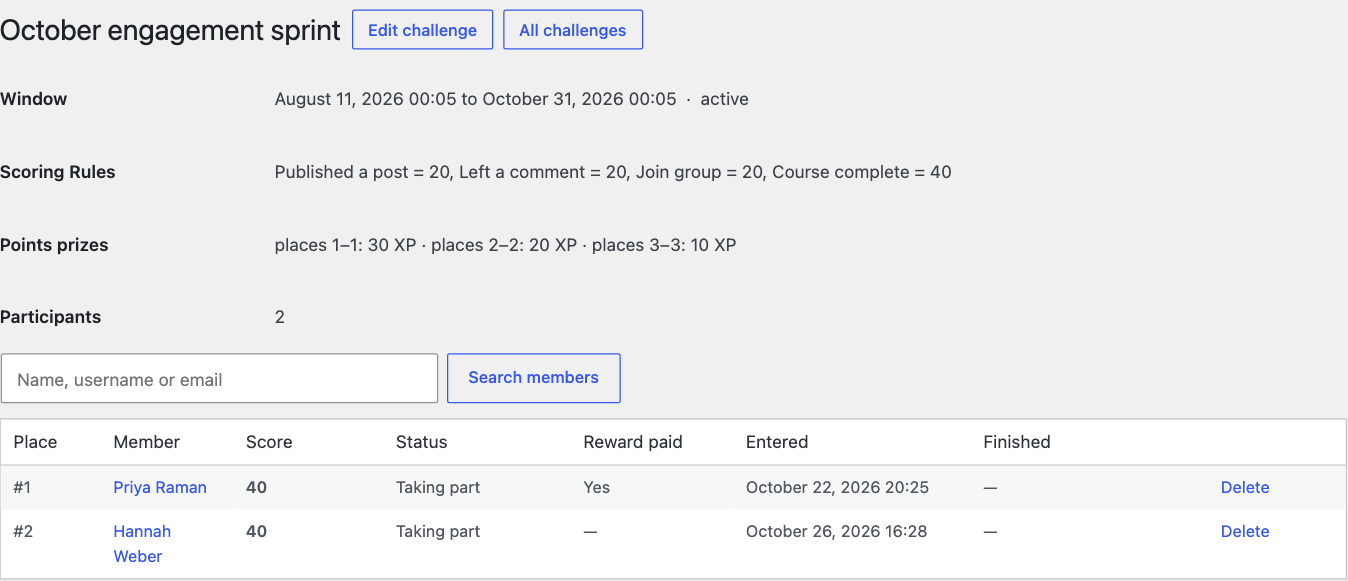
| Column | What it shows |
|---|---|
| Place | The member’s position. |
| Member | Who took part. Search by name, username or email. |
| Score | Their challenge score. |
| Status | Taking part while it runs, Finished once it has settled. |
| Reward paid | Whether their prize has been paid. |
| Entered / Finished | When they joined and when the challenge settled for them. |
Remove a member from a challenge #
Click Delete on a row and confirm. The member’s score is removed, and so is the whole prize the challenge paid them: points and any bonus reward.
Careful: This cannot be undone.


